Best Way to Save Connects in Upwork
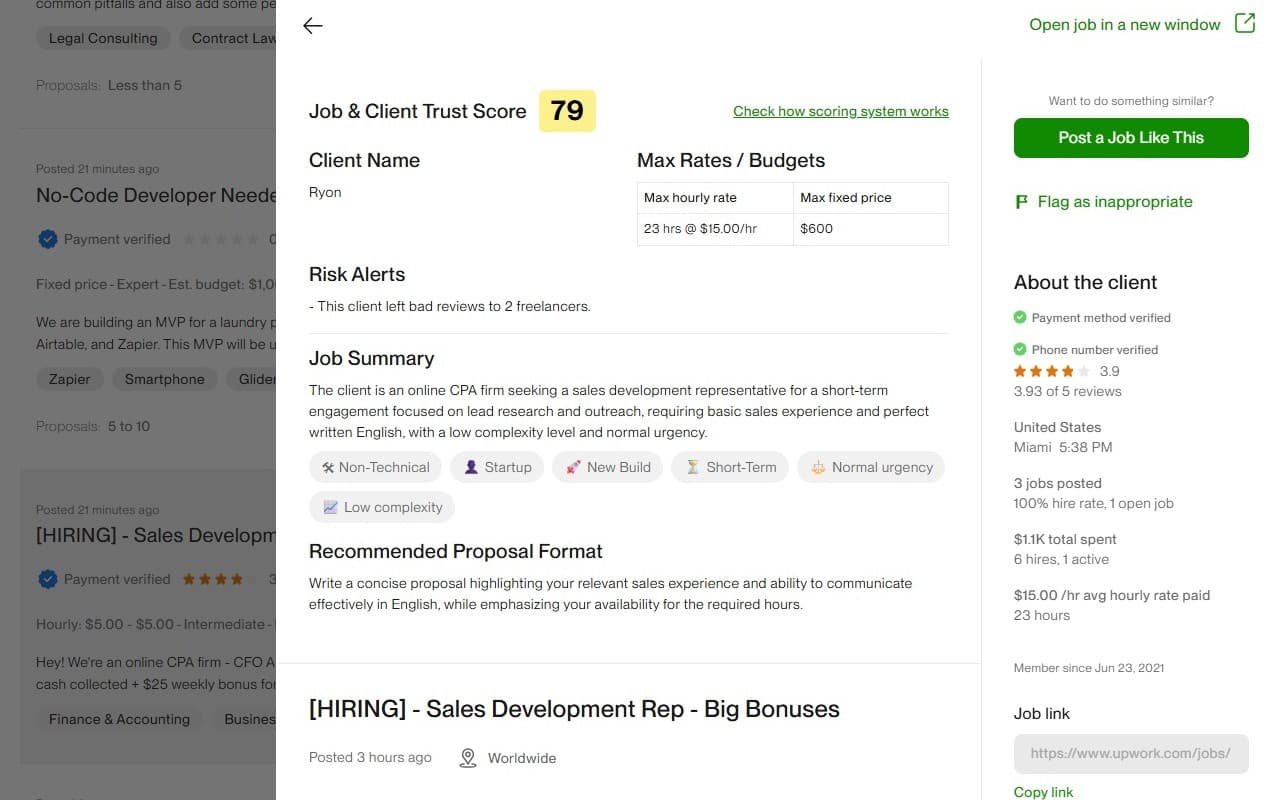
Most freelancers don't run out of connects because they are unlucky. They run out because they apply before they evaluate. If you analyze client intent, job quality, and competition first, your connects usually last longer and convert better.
In this guide, we'll use a practical framework you can run in minutes. Then we'll show how the BidPilotPro Job & Client Analyzer speeds up each step.
Why analysis matters before bidding
A connect is not just platform currency. It also represents your writing time and attention. A bad application costs connects and pushes out better opportunities you could have targeted.
That's why strong freelancers start with analysis, then proposal writing. If the opportunity is weak, the best proposal in the world won't save the bid.
The 3-layer pre-bid framework
Layer 1: Client intent
- Is payment verified?
- Does this client hire consistently or just post often?
- Do review patterns show healthy collaboration?
Layer 2: Job quality
- Is scope clear and outcome-focused?
- Does budget match the requested complexity?
- Are requirements concrete or vague?
Layer 3: Competition pressure
- How many proposals and invitations are already there?
- Do your skills fit this post at a niche level?
- Can you submit a highly relevant proposal quickly?
If 2 out of 3 layers look weak, skip. Saving connects is often about disciplined skipping, not just better writing.
Detailed risky client examples
1) The "Window Shopper"
Many posts, very low hires, and long inactive job history usually means the client is exploring, not executing. Your proposal may be read, but hiring intent is low.
Risk: High connect burn, low interview probability.
2) The "Fresh but Uncertain" Client
New account plus unverified payment plus urgent broad scope. None of these alone is fatal, but together they create a high uncertainty profile.
Risk: Delays, churn, and unclear commitment.
3) The "Friction History" Client
Repeated feedback patterns around communication issues, shifting requirements, or abrupt contract endings are often signs that delivery may become difficult regardless of technical fit.
Risk: Time drain and scope instability.
4) The "Broadcast" Client
High invitation volume, high proposal count, and generic job text often create a crowded funnel where only very niche matches convert.
Risk: Low response odds unless your profile is highly specialized.
A daily routine to protect connects
- Open 10 fresh jobs in your niche.
- Run the 3-layer filter on each job.
- Shortlist only top 2-3 opportunities.
- Send tailored proposals to that shortlist.
- Review weekly response rate and refine filters.
You can pair this with Upwork job filters and notifications so stronger jobs surface earlier in your day.
How our analyzer works simply
The BidPilotPro Chrome extension reads visible Upwork job and client signals, converts them into a clear score, and adds short AI-generated notes so you can decide quickly.
- Client and job signal checks
- Fast score for opportunity comparison
- Risk notes for caution areas
- Plain-language bidding guidance
After analysis, move straight to execution with our proposal generator and message copilot.
Final takeaway
The best way to save connects in Upwork is to treat bidding like portfolio management: analyze, filter, then invest connects only where probability looks strong.
Get Started Free